
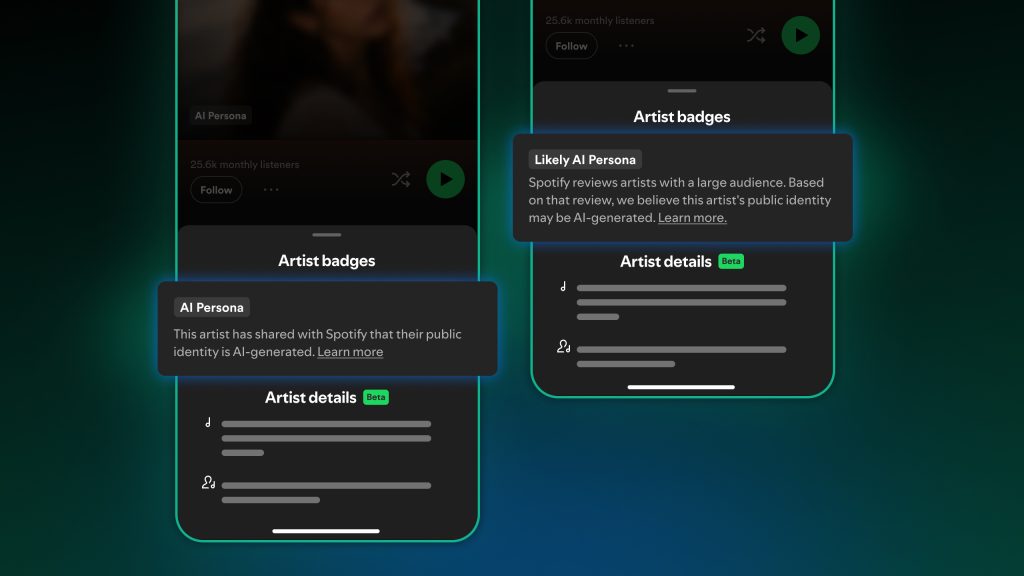
Spotify is introducing AI Persona badges to provide clearer context on who users are listening to. Starting mid-September, Persona Badges will appear on the mobile app in Search, Now Playing View and Artist Pages, with playlist track rows to follow. Spotify will also be introducing this feature to web/desktop in the coming weeks. When listeners tap the badge, they’ll be able to see whether the artist has transparently shared that they’re an AI Persona to build trust with potential listeners, or if Spotify had to review and make an informed determination.
An AI Persona is an artist project built around an AI-generated public identity. This is about who the artist presents as, not how the music was made.
What’s ahead
- Starting today: Artist teams can begin self-disclosing AI Persona status through Spotify for Artists.
- Mid-September: AI Persona labels begin appearing to Spotify users.
- Spotify will begin reviewing profiles that appear to represent AI-generated identities but have not self-disclosed. If a profile meets criteria, Spotify may apply a “Likely AI Persona” label; artists will be notified and given the opportunity to self-disclose or appeal.
- If the artist has chosen to identify themselves as an AI persona through Spotify for Artists, they will receive an “AI Persona” badge
- Later this year: Spotify plans to give listeners the ability to report profiles they believe may represent AI Personas.
Music from AI Personas will not be included in editorial or algorithmic recommendations, unless a listener follows the artist or shows other active and intentional engagement signals. AI Persona music will also be ineligible for sponsored recommendations, such as Discovery Mode and Spotify display campaigns.
Following AI Credits, Verified by Spotify, and Artist Profile Protection, AI Persona badges are the next chapter in Spotify’s efforts to give listeners more transparency about what they’re hearing and who’s behind it. As the technology and industry landscape change, Spotify’s approach will evolve with it and the platform will continue to share more details as this work progresses.
How to Self Disclose an AI Persona
Spotify encourages artist teams who represent AI Personas to self-disclose early so listeners have clear, accurate context from the start.
To identify your artist profile represents an AI Persona:
- Log in to artists.spotify.com
- Go to Artist Settings
- Select Profile & Identity
- Turn on the AI Persona setting
- Select Update
AI Persona badges cannot be removed by artists and their team. Artists flagged through Spotify’s review will be notified and given the opportunity to self-disclose or appeal through Spotify for Artists. Steps on how to appeal will be available in Spotify for Artists.
For more information, you can read on Spotify’s website here
—
Label Engine Team